
How SocialDesk Turns 6 Hours of Posting Work Into 30 Minutes
How SocialDesk Turns 6 Hours of Posting Work Into 30 Minutes
If you manage more than one social account, you already know the pain: switching between apps, rewriting captions for each platform, resizing visuals, guessing posting times, answering DMs, then scrambling to do it again tomorrow.
SocialDesk exists so you never have to work like that again.
By combining AI content generation, smart scheduling, and a unified inbox, SocialDesk takes what used to be a 4–6 hour weekly grind and turns it into a focused 30–60 minute session. You batch your ideas once, let the AI do the heavy lifting, and schedule everything in one dashboard.
This article walks you through exactly how that looks in real life.
The Old Way vs The SocialDesk Way
Let’s make this concrete with a simple scenario: one brand, six platforms, posting five times a week.
The old way (manual):
- Brainstorm ideas: 45–60 minutes
- Write and adapt captions for each platform: 2 hours
- Design or resize visuals: 1–2 hours
- Manually post on each network at different times: 1 hour
- Reply to comments and DMs from separate apps: 1–2 hours spread across the week
You’re easily at 6+ hours per week.
The SocialDesk way:
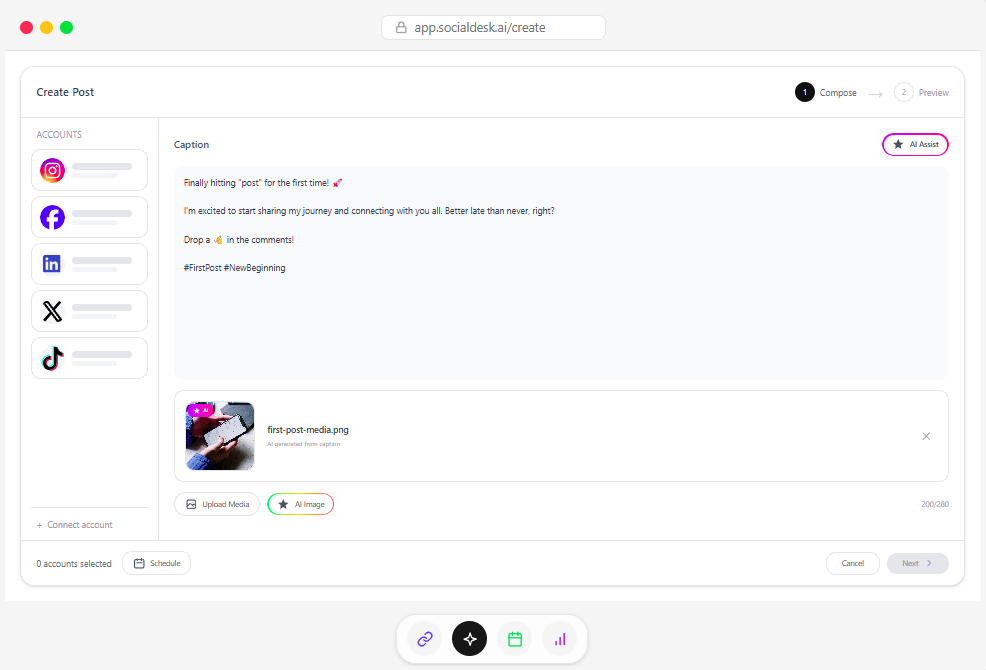
- Drop your ideas or rough notes into the AI caption generator
- Let AI adapt them per platform (tone, length, hashtags)
- Use the scheduler to auto-publish at optimal times
- Monitor and reply from the unified inbox
That same workload usually drops to 30–60 minutes of focused work, then light engagement time.
You’re not just saving time. You’re shifting from reactive scrambling to strategic planning.
Step 1: Turn Ideas Into Multi-Platform Posts With AI
You don’t have a content problem. You have an energy and formatting problem.
Most marketers already have raw material:
- Customer questions from email and DMs
- Blog posts, webinars, or newsletters
- Product updates and case studies
- Behind-the-scenes stories
SocialDesk’s AI helps you turn that raw material into platform-ready posts in a few clicks.
A simple workflow that replaces hours of writing
-
Drop in your source:
- A short prompt like:
New feature: 24/7 chat support for our app users. - Or paste a paragraph from a blog or case study.
- A short prompt like:
-
Tell AI what you want:
Write 1 Instagram caption, 1 LinkedIn post, and 1 X (Twitter) post promoting our new 24/7 chat support feature. Brand voice: friendly, confident, no jargon. Audience: SaaS founders and marketing teams.
-
Refine, don’t rewrite:
- Edit phrasing that feels slightly off
- Add brand-specific phrases or CTAs
- Save good prompts as templates you can reuse
Working like this, you’ll often generate a full week of posts in 15–20 minutes, instead of drafting each caption from scratch.
Use SocialDesk’s creation tools to finish faster
SocialDesk also gives you handy helpers around your AI workflow:
- Use the LinkedIn Text Formatter to turn AI drafts into clean, skimmable LinkedIn posts with proper line breaks and bulleting.
- If you’re repurposing a carousel, use the Instagram Carousel Splitter to prep individual slides without manual slicing.
- Planning your grid visually? The Instagram Grid Maker helps you see how new posts will look together.
The more pieces you automate around the content, the more your creation time shrinks.
Step 2: Batch Scheduling Instead of Daily Posting Panic
Once your content is drafted, the real time-saver kicks in: smart scheduling.
Instead of:
- Posting whenever you remember
- Guessing times
- Logging into each app separately
…you set up a schedule once inside SocialDesk, and let it handle the publishing.
How SocialDesk’s scheduler saves you hours
Here’s a practical weekly routine that works for many social media managers and small business owners:
-
Monday: 30–45 minutes
- Review last week’s analytics in SocialDesk
- Brainstorm themes for the week
- Use AI to generate and adapt 5–10 posts
-
Same session: schedule everything
- Choose posting slots based on SocialDesk’s performance insights
- Drag and drop posts into the calendar
- Assign variants to different platforms (e.g., short for X, long for LinkedIn)
-
Rest of the week: light check-ins
- Pop into the dashboard once or twice a day to reply to comments and DMs
- Reshare top-performing posts where relevant
What used to be daily stress becomes a single content power hour.
Step 3: Let Auto-Replies Handle the Easy Stuff
DMs and comments are where leads and loyalty live, but they also eat time.
SocialDesk’s auto-replies help you protect your schedule while staying present.
You can configure:
-
Quick replies for common questions
- “What are your prices?”
- “Do you ship internationally?”
- “How can I contact support?”
-
Acknowledgment messages
- “Thanks for your message, we’ll reply within X hours.”
-
Story or short-form comment responses
Set rules like:
- If a DM contains “price” or “cost”, send a reply that shares your pricing page and asks a follow-up question.
- If a comment contains “how do I sign up”, reply with your signup link and a short explanation.
Auto-replies don’t replace genuine conversations. They free you from the repetitive, copy-paste questions so you can focus on the messages that actually need your brain.
Step 4: Use Analytics to Stop Guessing and Start Repeating What Works
The fastest way to save time on social is to stop doing what doesn’t work.
This is where SocialDesk’s analytics become a quiet superpower.
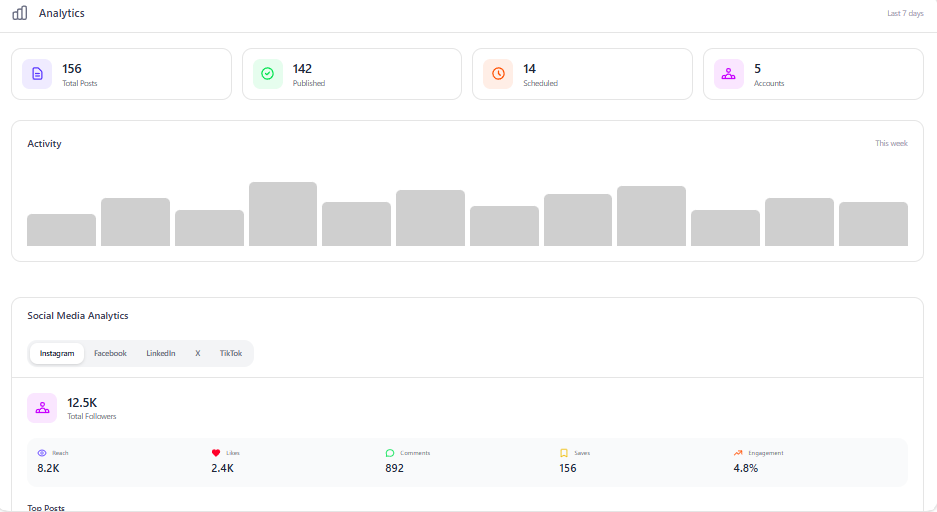
Inside your dashboard you can quickly see:
- Which posts drove the most clicks and impressions
- Which platforms currently outperform the others
- What posting times correlate with higher engagement
- Which formats (carousel, short video, plain text) are winning
Instead of making new content from scratch every week, you:
-
Sort your posts by performance.
-
Identify top 10–20% that overperformed.
-
Use AI to remix them:
- Turn a LinkedIn post into a Twitter thread
- Turn a carousel into a short video script
- Turn a TikTok into a LinkedIn thought-leadership post
You’re now building from winners, not guessing in the dark.
If you’re comparing tools, the Buffer vs SocialDesk or Hootsuite vs SocialDesk pages are helpful to see exactly how our analytics and AI stack up against what you might be using today.
Realistic Time Savings: What Users Actually Experience
Every workflow is different, but here’s what many users report after switching to SocialDesk:
-
Solo founder or small business owner
- Before: ~5 hours/week on content
- After: ~1.5–2 hours/week including engagement
-
Agency social media manager (5–10 clients)
- Before: scrambling daily, evenings included
- After: 1–2 batch days per week for creation and scheduling, then daily 20–30 minute client check-ins
The compound effect is huge:
- You stop context-switching between six apps
- You stop rewriting the same types of posts from scratch
- You stop guessing when and what to post
That freed-up time can go into strategy, offers, partnerships, or actual rest.
Bonus: Time-Saving Tools Around Your Posting Workflow
Outside of pure scheduling and AI captioning, SocialDesk includes small utilities that quietly shave minutes off your day, which add up fast over a month.
A few examples:
- Content downloaders: The SocialDesk Downloader tools help you save your own published videos or reference posts so you can repurpose and repost without hunting through each platform.
- Grid planning: The Instagram Grid Maker lets you visually plan how future posts will look together, so you don’t waste time redoing designs.
- Developer options: If you have in-house devs, the SocialDesk Developers section explains how to plug SocialDesk into your own tools and workflows.
Each of these on its own saves a few minutes. Together, they’re the difference between a rushed afternoon and a calm, planned week.
How to Start Cutting Your Posting Time This Week
You don’t need a full content overhaul to feel the difference. Try this simple plan over the next seven days:
- Connect your accounts in SocialDesk (Instagram, TikTok, LinkedIn, X, Facebook, YouTube).
- Choose one posting day and batch-create 3–5 posts using AI.
- Schedule them at SocialDesk’s suggested times.
- Turn on a couple of auto-replies for your most common questions.
- At the end of the week, check which posts and times worked best in your dashboard.
If that experiment saves you even two hours, you’ve already felt why so many users call SocialDesk a lifetime savior for their social workflow.
From there, you can scale up, compare it against tools like Publer or Metricool, and build a system that finally respects your time.
Your content doesn’t need more effort. It needs better infrastructure. SocialDesk gives you that, with AI, scheduling, analytics, and a unified inbox inside one calm dashboard.